Prepare your Heylo solution correctly
In this article, learn how to prepare Heylo correctly to live your life without worrying about leakage.
Heylo is compatible with the majority of baseplates.
The correct size of the sensor layer is dependent on your ostomy product solution. Please consult your stoma care nurse or call Coloplast for specific guidance.
Currently we do not recommend Heylo for use with firm output as it's not covered by the indications for use.
The Heylo sensor layers can be worn in whatever situation you normally wear your ostomy product. It is recommended that you remove the transmitter before swimming, bathing, or showering. If exposed to water, you should dry your transmitter and sensor layer connector flap thoroughly.
For more information: check the drying guide in the IFU https://docshub.coloplast.com/ifus/
Yes, you can wear the product in whatever situation you normally wear your ostomy product. In case of excessive sweating or sweating over a longer period of time, the system may become worn out, and the system will notify you if this happens.
Over time, your sensor layer might get exposed to moisture from your skin and/or your stoma. If too much moisture or sweat is absorbed by the sensor layer over time, the sensors can wear out and become unable to detect leakage and notify you if a leakage is developing. If this happens, you will be notified that your sensor layer’s sensors are ‘worn out’ - in which case you might want to change your sensor layer to stay informed.
Heylo sensor layer and transmitter should not be worn in an MR scanner. Keep it outside of the MR scanner room. Both sensor layer and transmitter, contain electrically conductive and magnetic material.
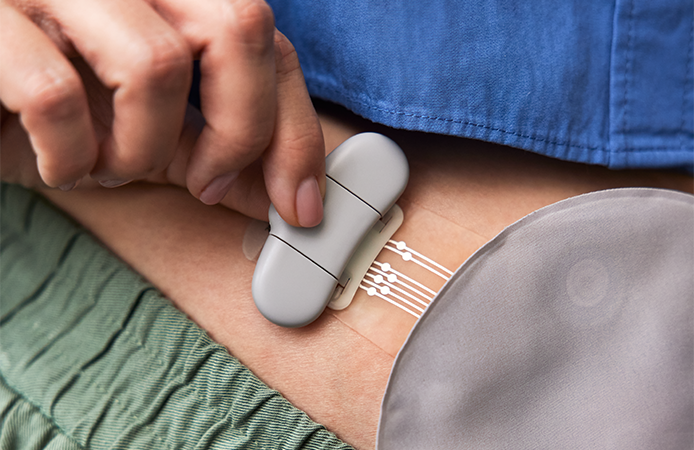
You can place the transmitter in the orientation that suits your body best and is convenient for you. While choosing the optimal position, keep in mind any scars and skin folds. Also avoid placing the transmitter in a way where it will be subjected to unnecessary pressure by tight clothing, underwear, or belts. This can help you avoid discomfort while wearing it.
Heylo works together with your current baseplate and should be changed together with your baseplate in accordance with your change routine.
Heylo has not been tested with patients undergoing chemotherapy. It should therefore be discussed with the HCP before using it during chemo- or radiotherapy.
Heylo has been tested with urostomy, and it was found the signal behaves differently than from liquid/mushy ileo/colo output. For this reason, we would need to adjust the product in order for it to work accurately for people with a urostomy. This will of course be considered for future development.
The correct size of the sensor layer is dependent on your ostomy product solution. Please consult your stoma care nurse or call Coloplast for specific guidance.
We are using well known adhesives from the SenSura® Mio products.
The sensor layer is flexible, and it is designed with individual peristomal bodies in mind. Heylo gives users the same freedom of movement as with their current ostomy product solution.
In clinical studies, Heylo has been proven not to compromise baseplate performance.
The sensor layer is placed firmly on the baseplate adhesive to ensure strong contact between the two. When applied, the sensor layer has direct contact with the skin around the stoma - it is only in the sensor layer area that the sensor layer adhesive will replace the adhesive of the baseplate. The sensor layer adhesive is based on the well-known SenSura Mio® products.
If Heylo is not in direct contact with the skin, the ability of the sensors to detect leakage will be impaired. If Paste (tube / strip) is used in a diffuse manner it will cover a larger area of the adhesive and could prevent direct contact between Heylo Sensor Layer and the baseplate or the skin. In this case Heylo should not be used as it would not be able to detect leakage and just show all is good (no message is sent via the Heylo app).
The Heylo app will consume up to 20 MB of data per month.
The Heylo app will follow the general sound settings on your phone. Please make sure that sound is turned on and volume is turned up.
You can adjust the volume of Heylo notifications through your phone’s volume settings as you would normally. At night, you may wish to use ‘Bedtime mode’, as this mode will only notify you when leakage is detected on the outer ring (or other times your attention is needed – e.g., when the system has stopped working for any reason), and will do so with a ringing sound, during the time interval you set. This mode also has the ability to bypass ‘Do not disturb’ mode – meaning you can continue to be notified by Heylo while screening all other kinds of notifications.
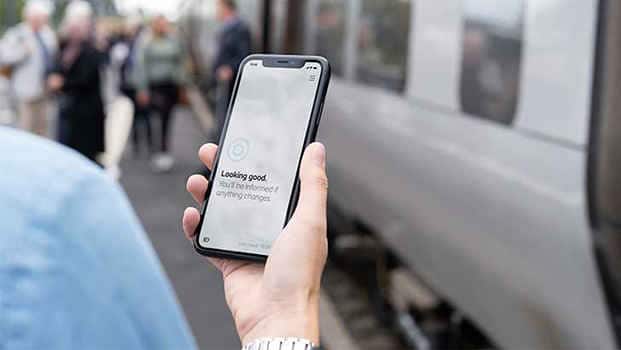
When wearing the Heylo system, you can find the battery charge indication in the bottom left corner of your app.
Yes, Heylo can be active alongside other Bluetooth-operated devices on the same smartphone.
Yes, just make sure the Bluetooth is turned “on” in your smartphone’s settings.
Heylo is developed for use with smartphones, but as some smartwatches support showing notifications from smartphones, Heylo notifications may also be pushed to your smartwatch.
Coloplast will not track your location. Heylo asks for access to your location data to allow your transmitter to broadcast its location to your phone should a connection be lost to allow it to reconnect seamlessly. For more information: See the location guide https://docshub.coloplast.com/ifus/
Updates to Apple’s security policy mean that your phone will occasionally check that you are still happy with the location settings for your apps.
Yes, you can export data from the Heylo App in PDF format, that you can share and discuss with your nurse.
Heylo can only be installed on smartphones with a compatible Operating System (OS). If the OS version is too old, it will not be possible to install the Heylo app. Coloplast recommends to always update to the newest available OS before downloading Heylo.
The transmitter will charge fully in approximately 2,5 hours, and the charge will last 2-3 days.
.You can use the cable provided with the product for charging.
To charge the Heylo transmitter, you can use a USB-type adapter (e.g., the one you use for your smartphone).
The light on the charger provides information about the charging status, whether it is: charging, fully charged, or in pairing mode. Please see the instructions for use for further information.
If the transmitter is exposed to water, we recommend you follow the instructions in the IFU (Instruction for use) and disengage the lid until it opens completely. Then dry the metal connector pins and the surrounding area with a soft cloth.
The transmitter should be handled the same way as other electronic devices when going through airport security.
Heylo is not currently tested or approved in a population of children under 12 years of age.
All electrical medical devices are tested according to IEC 60601-1-2 for emission and immunity for electromagnetic disturbances. Heylo is compliant with the standard and emission levels from the device are within allowed limits. There are currently no restrictions for the use of Heylo with other medical devices. We commend to discuss this with a healthcare profession prior to use.
The app/smartphone can only receive data from one transmitter at once. The app/smartphone can pair with up to 2 transmitters in total meaning the user does not need to pair each time they switch between two transmitters e.g. for charging purposes. However, if a transmitter breaks or is lost, the connection should be deleted, to allow for a new transmitter to be paired.
A transmitter can only connect with one smartphone/app at once.
The Heylo Transmitter is designed and tested to be waterproof at the IP57 level, meaning it is protected against the effects of temporary immersion in water.
In case your Heylo™ system has been exposed to water, it is critical for functionality that water is dried off before usage.
We are always trying to improve the performance of Heylo. Like when the app gets updated, we also occasionally update the transmitter.
In June 2025, a critical transmitter update is coming to improve the security and overall stability of the transmitter. This is a mandatory update.
When the update comes your way, you will be notified by the App and guided through the steps to complete.
If it is a critical update, once you’ve been notified by the App that the update is available, you will not receive any leakage notifications till you have updated.
For the June 2025 transmitter update, the first time you place the transmitter on the changing dock after the update has completed, your transmitter will disconnect, and you will need to pair your transmitter to your phone again. You will be informed and guided through the steps in the app.

If the update is interrupted, please ensure your transmitter has at least two bars of battery left, the transmitter is nearby, your Bluetooth is on, and you have a stable internet or network connection. Follow the steps in the app to resume the update.
It is important that you do not remove your transmitter from your device settings during this time. This can interrupt the update and potentially break the transmitter.
Yes, both transmitters will need to be updated. If you have both transmitters nearby, you will have to update them both right after each other, however, if your second transmitter is not nearby, you will receive another notification about the update once it is nearby.
If you only have one transmitter and you have updated it, try closing and reopening the app or waiting a few minutes.
If you have two transmitters and the second one is nearby, this could be the one needing updating.
Due to the nature of the critical transmitter update coming in June 2025, the transmitter will unpair itself and you have to pair it again to the device. This will happen when it's placed on the charging dock, and you should follow the steps in the app to pair again.
If the app cannot pair to the transmitter again either by saying that the transmitter is not found or pairing failed, please go to your device settings > Bluetooth > Remove your transmitter ('Forget device').
Reopen the app and try pairing again. If the problem persists, please reach out to customer support.
In this article, learn how to prepare Heylo correctly to live your life without worrying about leakage.
Ensure your routine is on point to make sure that you get the most out of your Heylo.
It is important to dry off Heylo before use if it has become wet. Learn what to do if Heylo gets wet.